

Private security company · Security & operations · 2026 · Python · ONNX Runtime · Qdrant · Next.js · ElysiaJS
Cameras that tell you what happened.
A self-hosted video intelligence platform: live camera feeds become searchable events, alerts and scheduled reports, with no footage or face data leaving the organisation.
- Industry
- Security, facility management & operations
- Scope
- Product design, computer-vision engineering and deployment
- Delivered
- Real-time analytics engine · alerting and notifications · scheduled reports
01 / Challenge
Why did cameras everywhere still leave everyone guessing?
An organisation with many sites had cameras everywhere, but cameras only record. They don't tell anyone what is happening.
Security teams
Watched walls of screens. Events were missed, or found only after the fact.
Site managers
Had no simple way to know who had been on site, and when.
Reviewers
Searched hours of footage by hand to answer a single question.
Leadership
Got no summary of activity across sites, only anecdotes.
Off-the-shelf analytics were tied to one camera brand, and the people-recognition data sat in a vendor’s cloud. The organisation needed something it could run on its own hardware, with its own models.
Turn ordinary camera feeds into trustworthy events, alerts and reports, without sending footage or face data outside the organisation.
02 / Solution
What turns live video into events?
A vision engine that takes live video from any camera and runs it through configurable pipelines. Each pipeline is a chain of stages that detect, track and recognise faces and objects, then turns what it sees into events.
What it covers
Cameras and sites
Cameras grouped by location and site, started, paused and stopped on demand
Pipelines
Stages chosen and ordered per camera, with their own settings
Face recognition
Detection, alignment and matching against enrolled people
Object detection and tracking
People and other objects followed from frame to frame
Subjects and registries
Approved sets of known people (or other things), kept separate from each other
Events
A searchable record of what was seen, where and when
Alerts
Rules that fire on what the cameras see, with de-duplication to prevent floods
Notifications
Alerts sent to the channels each team already uses
Reports
Scheduled and on-demand activity reports with charts, delivered as PDF or email
Contact points
Multiple delivery channels per alert: email, WhatsApp and in-app notifications
Edge locations
An agent installed on the premises forwards streams to the analytics server, so no stream is exposed to the public internet
Pluggable models
Several model architectures for the same analytics; weights swap for better ones without a redeployment
03 / Highlights
What makes it trustworthy in production?
Pipelines you assemble, not code
A pipeline is a list of stages picked from a catalogue. Operators can add a stage, change a setting, or swap a model without a software release. Each stage keeps a stable identity, so metrics and settings stay attached to the right step even as pipelines are edited. Try adding, reordering or removing a stage.
Camera source.camera
Settings / Face detection
operator.face_detection
Add stage
Recognition that doesn't drift
Enrolling a person from a photo uses the exact same detection and alignment as live recognition. Stored and live faces are always compared fairly, which is the most common reason recognition quietly degrades elsewhere. Run it both ways and compare the scores.
Enrolment · uploaded photo
Live · camera 04
Known people and passers-by, kept apart
Lasting identities live in reviewed registries that never expire. People recognised only by appearance are temporary: scoped to one site, expired after a set time, their appearance data then discarded. A reviewer can link a temporary identity to a known person, and the link applies to the whole visit without triggering alerts for the past.
Temporary · one site · expire
Known · reviewed · never expire
- Asha Rao
- Dev Menon
- Meera Iyer
Left alone, V-0412 and its appearance data are discarded when the clock runs out.
Your models, your hardware
The platform ships support for families of models, not the weights themselves. Customers register their own models, so licensing stays in their hands and models can be swapped as better ones appear. It runs on standard CPUs, with optional accelerated runtimes. Swap one: the pipeline keeps running.
Registered weights
Per frame
9.0 ms
Frames / s / core
111
Recall
91%
Pick a model or runtime
Pipeline uptime 03:22:22
Resilient by design
Failed frames are dropped rather than stalling a feed. Per-stage metrics show where time goes, so a slow camera or model is easy to find. Overload one camera and watch the other two.
Alerts that don't flood
Rules fire on what the cameras see and go to the contact points each team already uses: email, WhatsApp or in-app. A cooldown de-duplicates repeats, so one person lingering at a door is one alert, not twenty.
Cooldown
04 / Product
What does the console look like in use?
01 / Pipeline builder
A pipeline, stage by stage
Camera in, then frame rate, face detection, face recognition and a dispatcher, each with its own settings. Stages are reordered, added from the catalogue or removed, and saved without a release.
FIG. 04.1 / Pipeline builder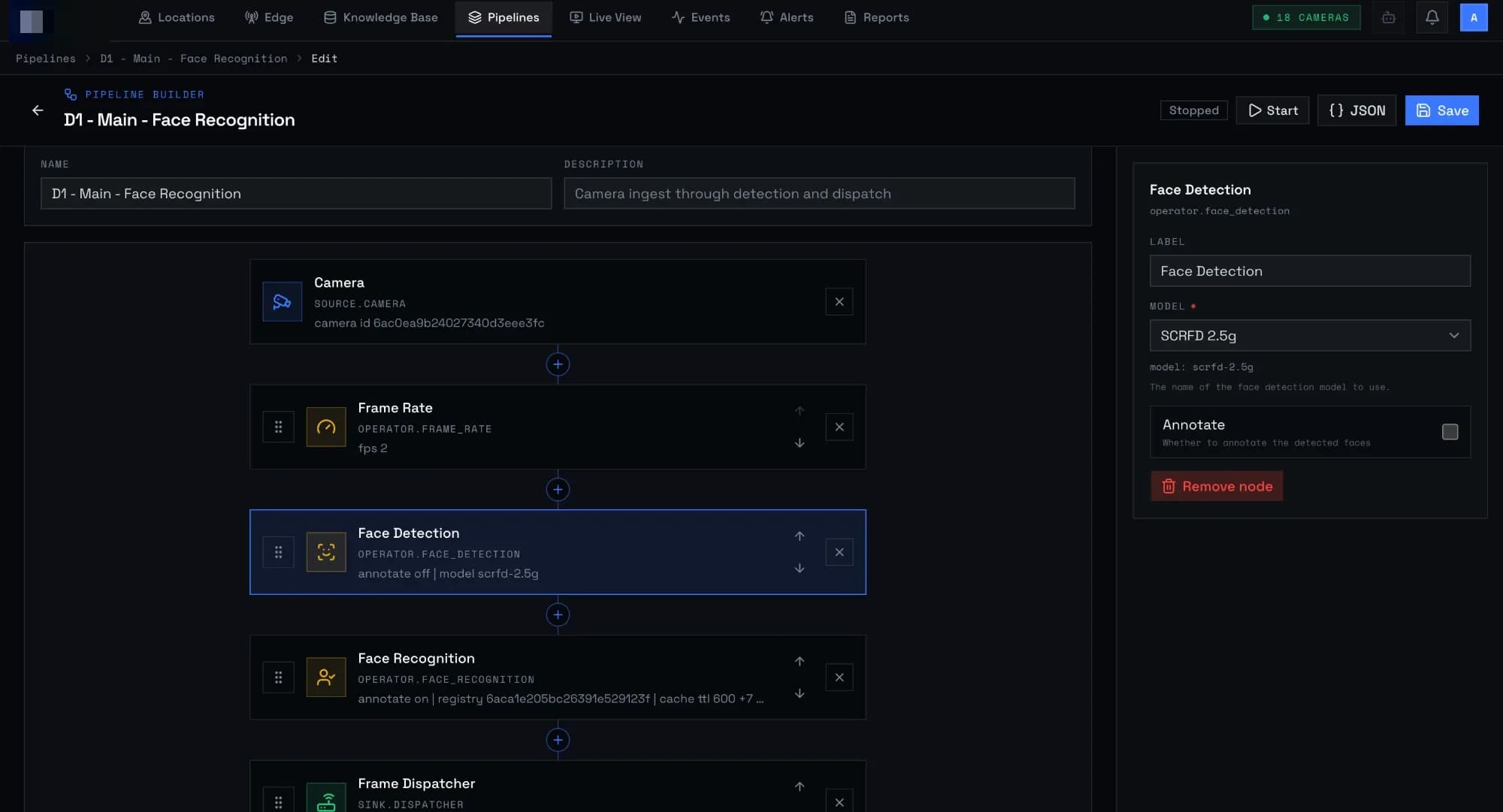
02 / Live view
What the pipeline sees, live
A running pipeline streams its annotated frames: each person tracked with an ID and a confidence, and the people recognised so far listed beside the feed.
FIG. 04.2 / Live view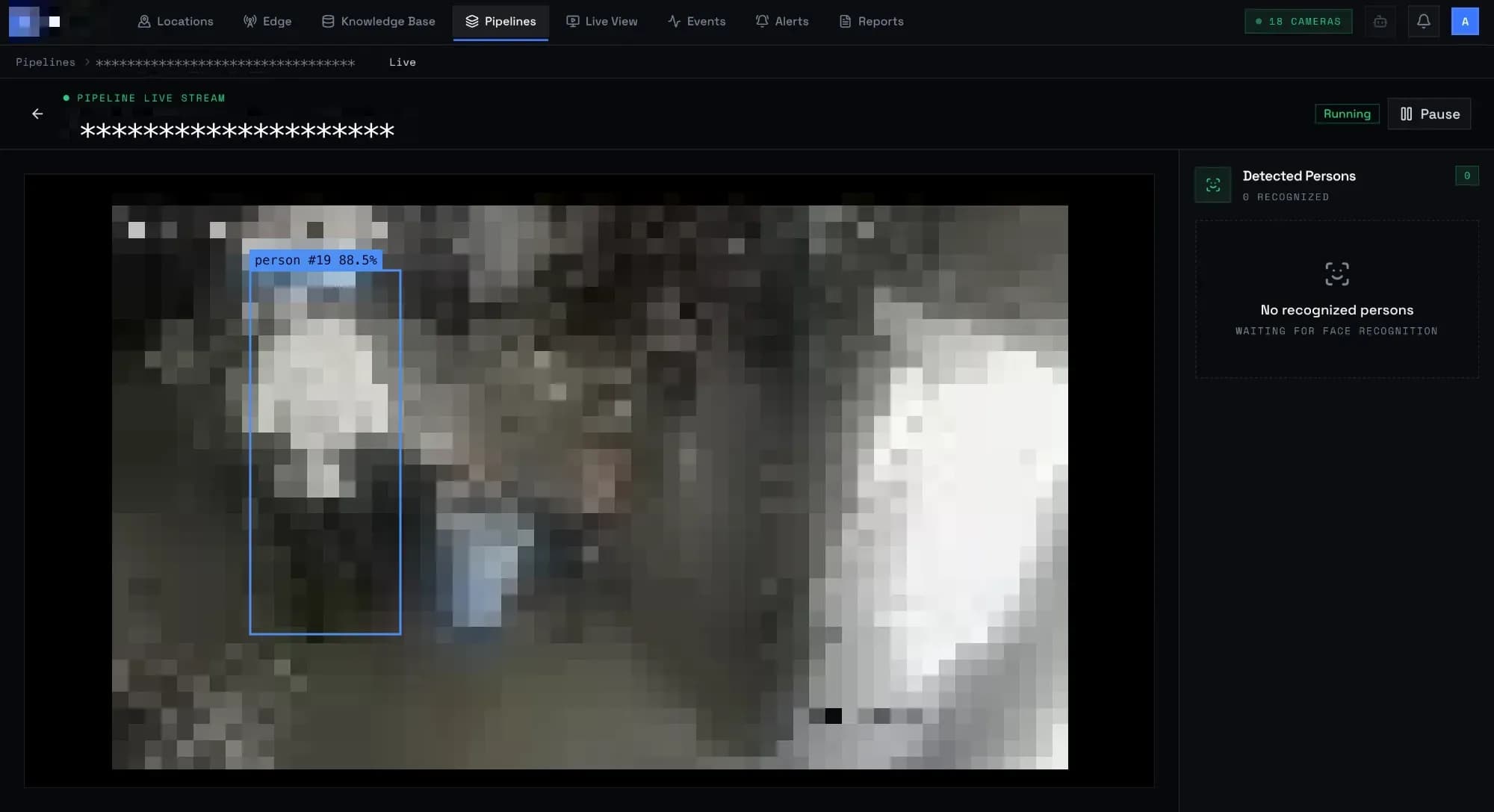
03 / Events
Footage, turned into a record
Every presence start and end and every occupancy change becomes an event, timestamped and searchable: thousands a week, without anyone watching a screen.
FIG. 04.3 / Events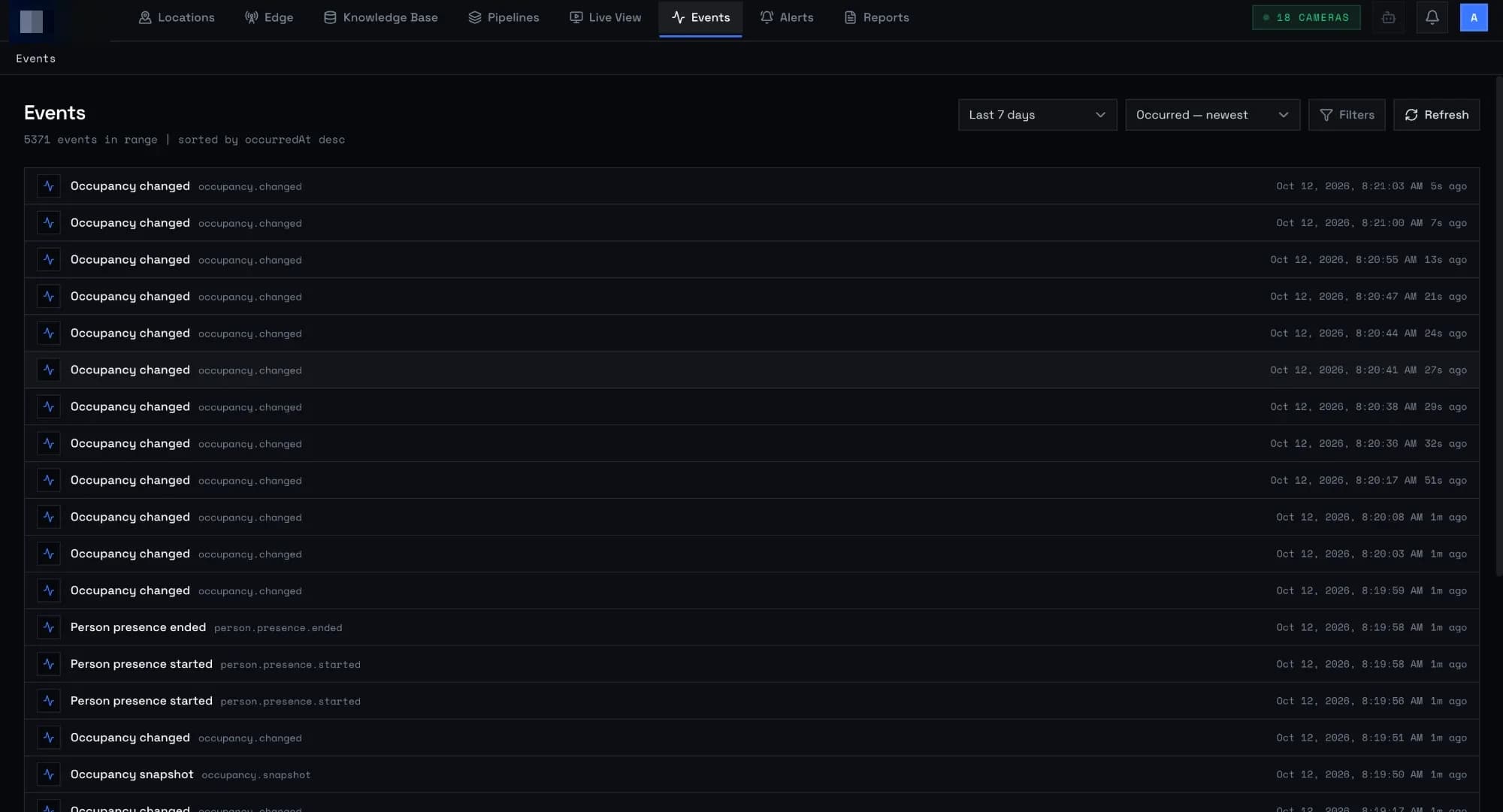
04 / Alert rules
Rules for what matters
After-hours presence, a watchlisted person, occupancy over a threshold or a camera that sees nobody. The rule type is fixed once created, so its configuration can't silently break.
FIG. 04.4 / Alert rules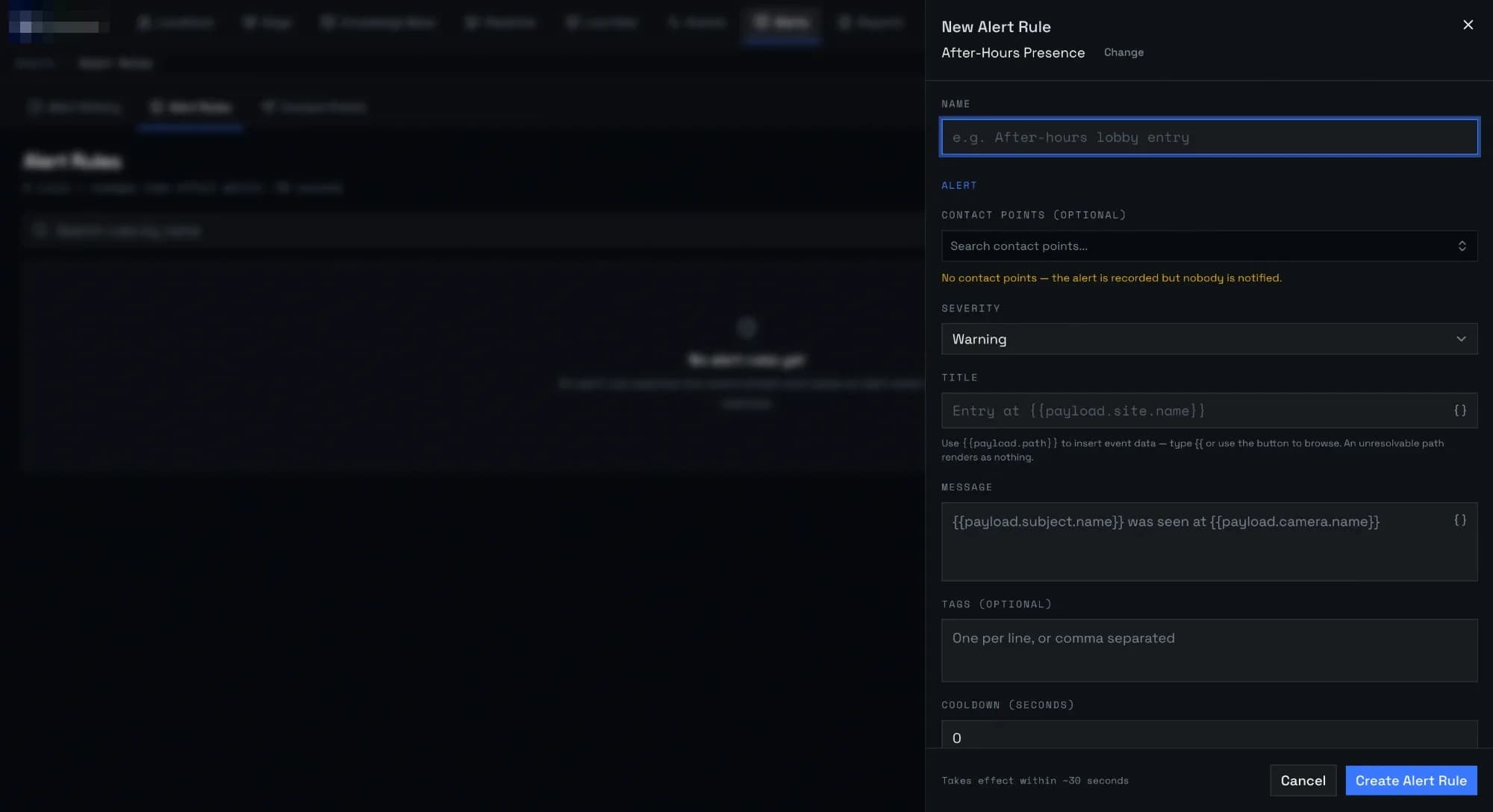
05 / Reports
A day of a site, on one page
Peak occupancy, people identified, entries and camera coverage, with occupancy through the day. Generated on schedule or on demand, as PDF, HTML, CSV or JSON.
FIG. 04.5 / Reports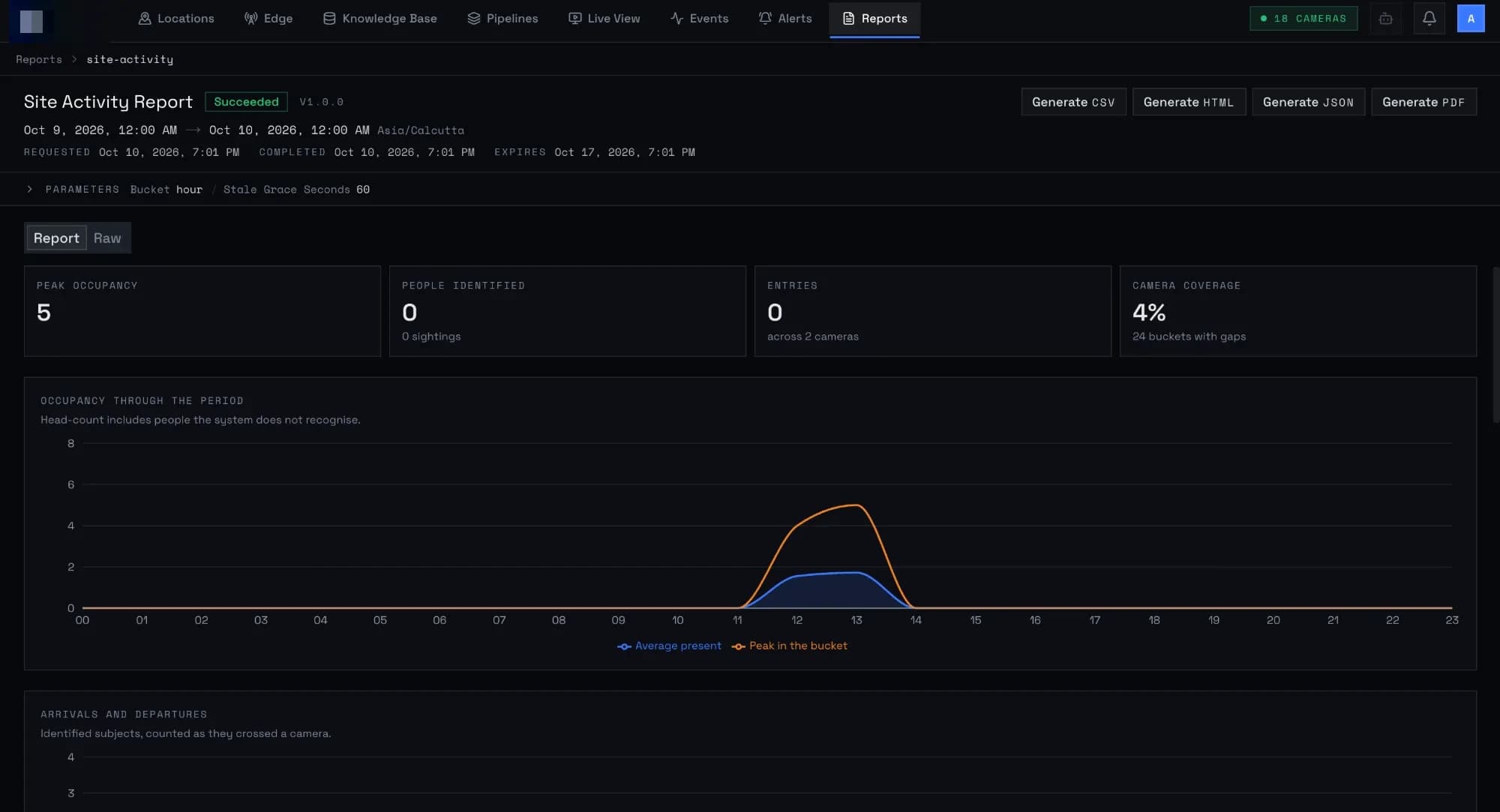
A pipeline, stage by stage
Camera in, then frame rate, face detection, face recognition and a dispatcher, each with its own settings. Stages are reordered, added from the catalogue or removed, and saved without a release.
FIG. 04.1 / Pipeline builder
05 / Architecture
How is it built so one bad feed never stops the rest?
- 01One engine, many camerasEach camera runs its own pipeline, and a problem on one never affects another.
- 02Organised by business areaCameras, pipelines, analytics, subjects, events, alerts, notifications and reports are separate modules with clear boundaries, so each can grow on its own.
- 03Event-drivenStages and services talk over a message bus, so new consumers (a new alert type, a new report) plug in without touching the vision code.
- 04Self-hostedEverything runs in containers on the client's own infrastructure. No footage or face data leaves it.
06 / Stack
What is it built with?
- Vision engine
- Python 3.13
- Control API
- Bun, Elysia
- Console
- Next.js
- Vision & inference
- ONNX Runtime, OpenCV, optional OpenVINO
- Detection & tracking
- Supervision, SciPy, NumPy
- Face matching
- Qdrant vector search
- Messaging
- NATS
- Application data
- MongoDB (Beanie)
- File & image storage
- S3-compatible object storage
- Reports & email
- Matplotlib charts, PDF generation, MJML email templates
- Structure
- Dependency injection, domain-driven modules
- Delivery
- Docker, CI pipeline, automated tests
07 / Delivered
What did the client receive?
- 01Vision enginePipeline runtime with detection, tracking and face recognition stages.
- 02Model supportA model and extractor registry so customers can bring their own weights.
- 03Identity managementRegistries, enrolment from photos, temporary identities and review.
- 04AlertingConfigurable rules, de-duplication and multi-channel notifications.
- 05ReportingActivity reports with charts, as PDF and email.
- 06Control API and consoleA Bun + Elysia API and a Next.js console to start, pause, resume and stop pipelines and manage cameras, rules and reports.
- 07Domain documentationA shared glossary and recorded design decisions, so the whole team uses the same terms.
- 08Deployment setupContainer images and continuous integration.
08 / Impact
What changed for the organisation?
From footage to facts
Events are searchable the moment they happen.
Fewer missed moments
Alerts reach the right people without anyone watching a screen.
Privacy by default
Data stays on the organisation's own infrastructure, and temporary identities expire automatically.
No lock-in
Any camera, and the organisation's choice of models.
Visible performance
Per-stage metrics make slow or failing feeds easy to spot.
09 / What's next
Where does the platform go from here?
- 01Vehicle and licence-plate registriesThe same registry model extended to vehicles.
- 02Cross-camera journeysFollow a person across cameras within a site.
- 03Smarter alertsRules that combine time, place and behaviour, such as loitering or crowding.
- 04Edge deploymentRun pipelines on small devices at remote sites, reporting to a central console.
- 05Review workspaceA faster screen for reviewers to confirm, link and correct identities.