

Real-estate developer · Construction · 2026 · Next.js · PWA · Bun · ElysiaJS · PostgreSQL
One number, one place.
A construction operations platform for a real-estate developer: estimates, procurement, site progress and payments on one record, from first estimate to final payment.
- Industry
- Real estate & construction
- Scope
- Product design, engineering and rollout
- Delivered
- Web console for the office · mobile app for site teams
01 / Challenge
Why did every team have a different number?
The developer was running its projects on spreadsheets, chat groups and paper. The same figures were typed in again and again, and when they didn't match, nobody could say which one was right or who had approved it.
- EstimatorsNo match
₹4,82,500
Private spreadsheet
Priced work in spreadsheets that nobody else could see.
- Site teamsNo match
₹4,80,000
Chat group
Sent progress over messaging apps, and photos got lost.
- ProcurementNo match
₹4,85,250
Paper purchase order
Raised purchase orders by hand and tracked deliveries separately.
- FinanceNo match
₹4,79,900
Month-end workbook
Pieced payments together from all of the above, every month.
Figure is illustrative; the flow is the platform's.
A figure recorded on site and a figure reconciled in finance should be the same figure, with a clear approval trail in between.
02 / Solution
What runs a project from first estimate to final payment?
One platform in two parts, each designed for where it's used.
The office console
For project managers, estimators, procurement, stores, finance and HR. It handles detailed estimates, approvals and payments.
FIG. 02.1 / OFFICE CONSOLEThe site app
For supervisors and workers. Quick, simple tasks work on a phone, outdoors, even with a weak signal.
FIG. 02.2 / SITE APPWhat it covers
Projects and units
Project setup, unit types, milestones and stages
Estimates
Detailed bills of quantity, rate cards and budgets for each stage
Contractors
Rate cards, assignments and work tracking
Procurement
Purchase requests, purchase orders, approvals and deliveries
Inventory
Stock levels and movements on every site
Site progress
Daily updates with photos and work logs
Payments
Contractor and supplier payments, and upcoming payment schedules
People
Employees, departments, and roles for each project
Dashboard
A live view of projects and finances
03 / Highlights
What makes it work on a real construction project?
Estimating that feels familiar
Estimators kept the spreadsheet-style working they already know, with formulas, copy and paste, and undo, inside the platform. Existing Excel estimates can be imported, and any problems are shown for review before anything is saved. Try editing a dimension, or typing a letter into one.
| A · Room | B · Length (m) | C · Width (m) | D · Depth (m) | E · Volume (m³) | |
|---|---|---|---|---|---|
| 2 | Living / dining | ||||
| 3 | Bedroom 1 | ||||
| 4 | Bedroom 2 | ||||
| 5 | Kitchen | ||||
| 6 | Balcony |
Every rupee accounted for
All payments to contractors and suppliers live in one place. Records are never overwritten; a correction is added as a new entry. Finance sees one clear total of money going out, and every payment traces back to the work or delivery it pays for.
Money out, all time
₹3,89,000.00
- 122 AugCement supplier · PO-0001400 bags delivered₹1,64,000.00
- 223 AugMasonry contractor · brickworkWork log approved₹2,25,000.00
The right access for every role
Office roles and on-site reporting lines are handled separately, the way construction teams actually work. Budgets, purchase orders and work logs each have their own approvals, with a record of who approved what. When someone can't do something, the platform tells them why.
Signed in as
Cement and steel for Block A foundation
₹1,64,000.00 · Amar Cement Traders
Not available to site supervisor
Site supervisors raise purchase requests. Approving the order sits with the project manager.
- 22 Aug · Created by site supervisor
- Next · Approval by project manager
Built for the site
The site app works on everyday Android phones, in bright sunlight and with gloves on. Progress is recorded mainly with photos. If the connection drops, the app shows clearly that it's offline and doesn't lose your work.
Block A
Progress feed
You're offline. Updates are saved on this phone.
- Footing excavation completed along grid lines A–C.Synced · 12 on site · Sunny
04 / Product
What does the office console look like in use?
01 / Unit estimate
A bill of quantities per unit
Substructure, superstructure and finishes, each tied to a milestone, with quantities, rates and the unit's grand total.
FIG. 04.1 / Unit estimate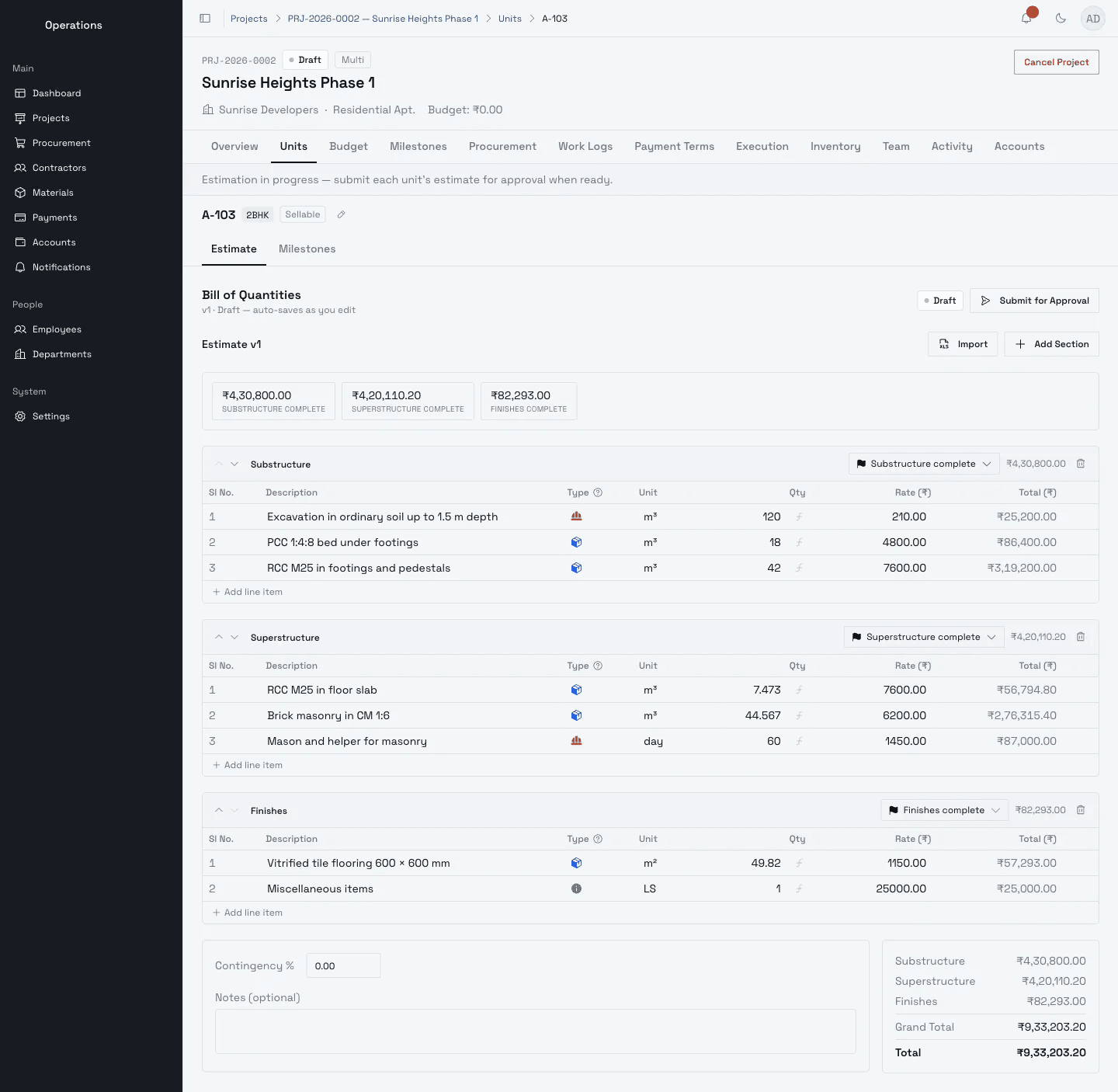
02 / Consolidated budget
Every unit rolled into one budget
Sellable units and common works add up to the project budget, and the platform says plainly when units are still missing an estimate.
FIG. 04.2 / Consolidated budget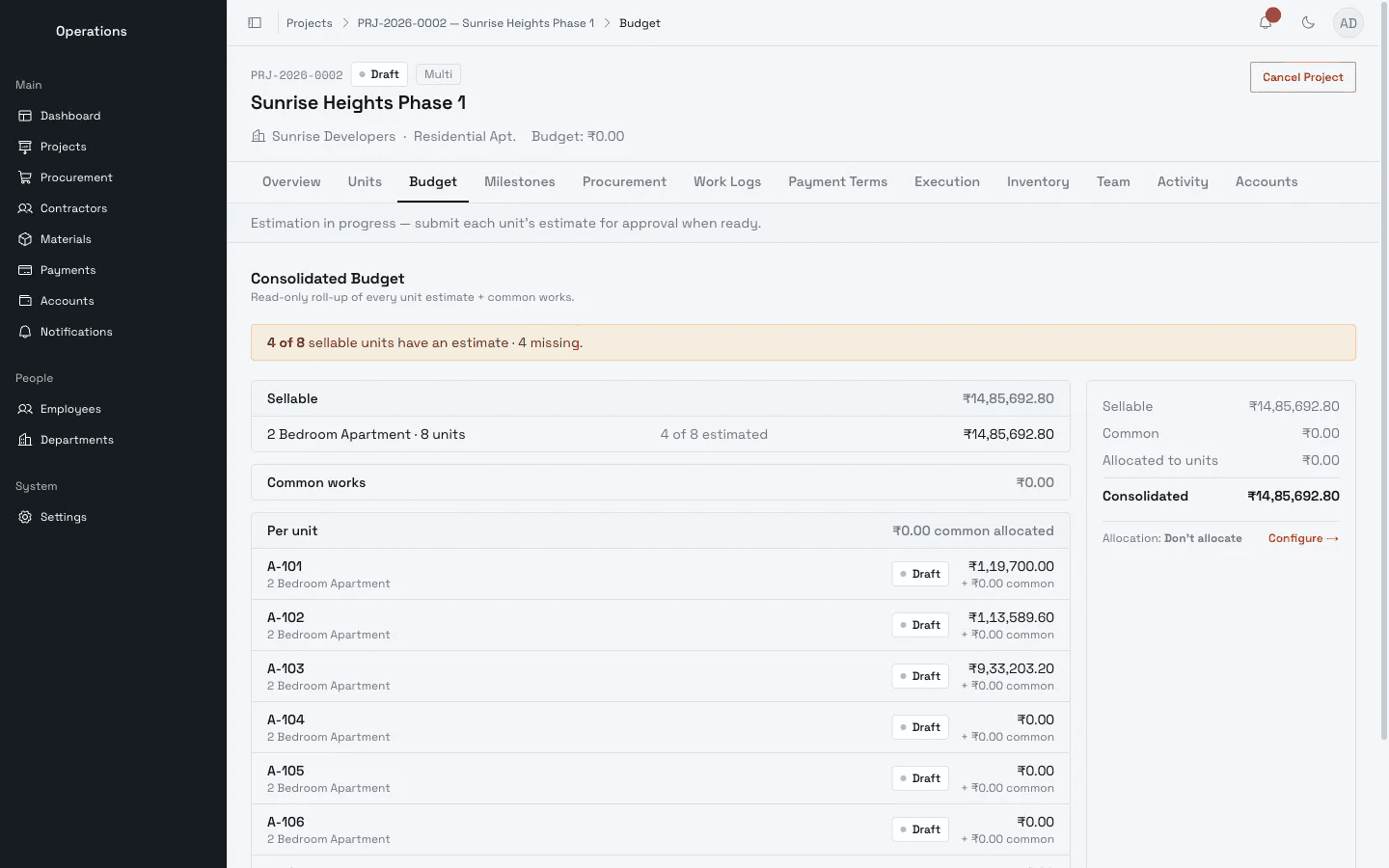
03 / Purchase order
Orders that know their budget
Each purchase order shows what was ordered and delivered, how much of the approved estimate it commits, and its approval timeline.
FIG. 04.3 / Purchase order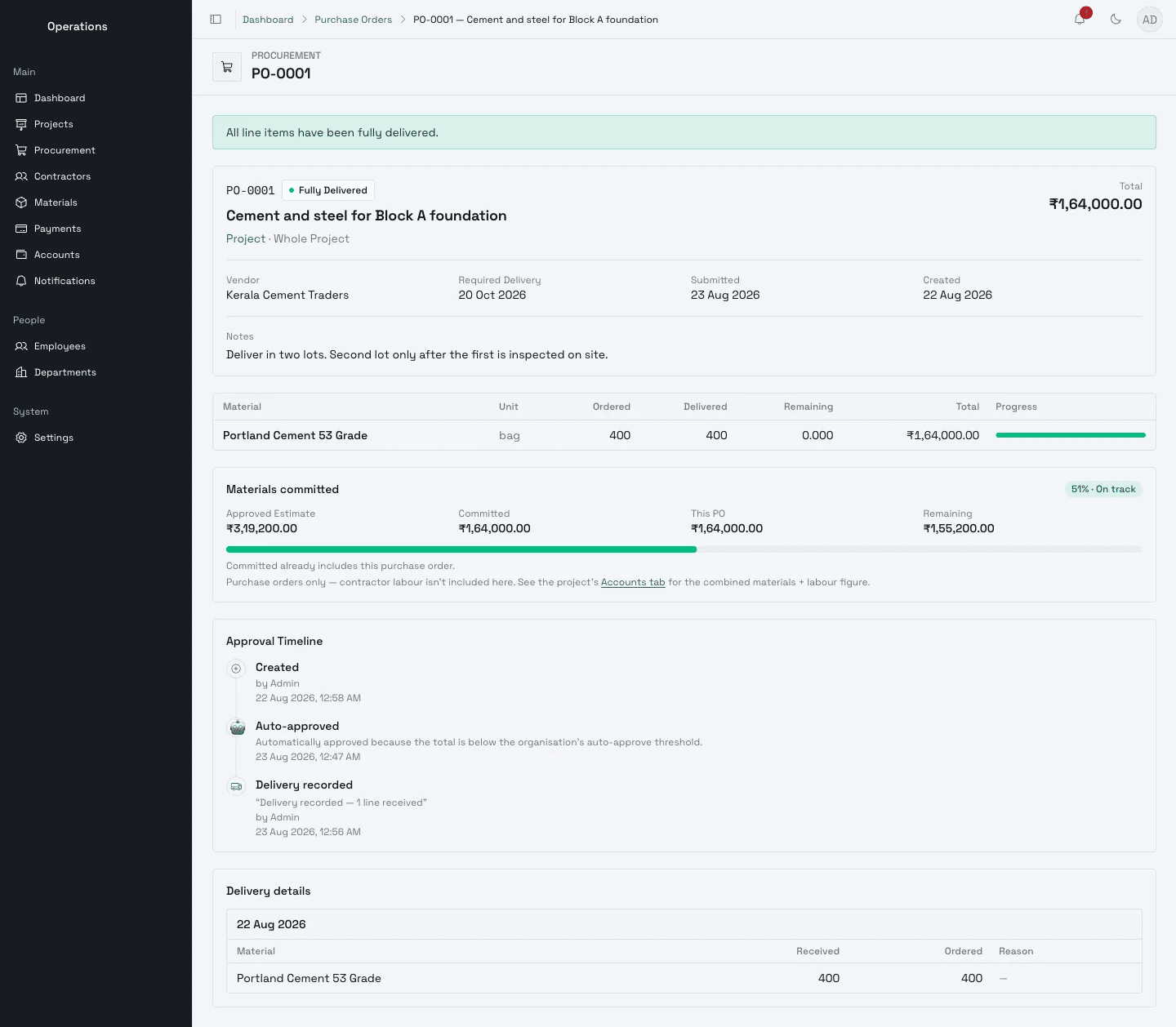
04 / Accounts
Finance sees one total
Approved budget, committed and paid across every project, the cash leaving in the next ninety days, and spend against budget over time.
FIG. 04.4 / Accounts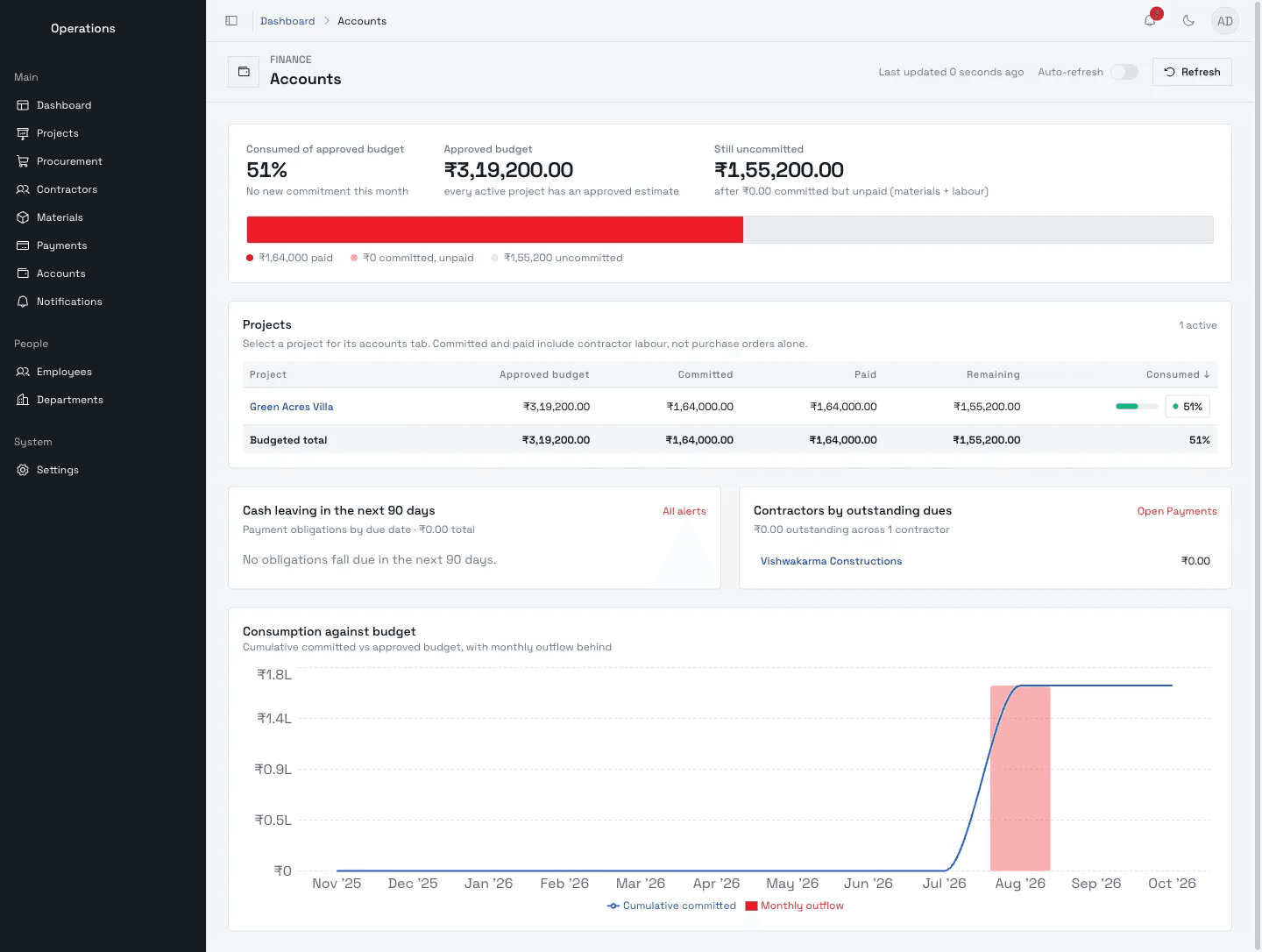
A bill of quantities per unit
Substructure, superstructure and finishes, each tied to a milestone, with quantities, rates and the unit's grand total.
FIG. 04.1 / Unit estimate
05 / Architecture
How is it built so every figure has one version?
01 / 04
Two apps, each built for where it's used
The office console runs in a browser for estimates, approvals and payments. The site app installs on a phone and keeps working on a weak signal.
02 / 04
One backend, one version of every figure
Both apps talk to the same API server, behind Caddy for automatic HTTPS. They share one set of data and rules, so a figure cannot differ between them.
03 / 04
Organised by business area
Projects, procurement, payments and people are separate modules over one PostgreSQL database, so new features land without disturbing existing ones. Redis and BullMQ run background jobs; photos and files go to S3-compatible storage.
04 / 04
Self-hosted, ready for more companies
Everything runs in Docker containers on the client's own server, with scheduled database backups. Each organisation's data is kept separate, so the platform can serve other builders later.
06 / Stack
What is it built with?
- Office console
- Next.js, React, Tailwind CSS
- Site app
- React Progressive Web App, installable and offline-capable
- Backend
- TypeScript on Bun, ElysiaJS
- Database
- PostgreSQL
- Background jobs
- Redis + BullMQ
- File & photo storage
- S3-compatible object storage
- Authentication
- Better Auth, with roles at company and project level
- Hosting
- Docker, Caddy (automatic HTTPS)
- Quality
- Automated tests and continuous integration
07 / Delivered
What did the client receive?
- 01Office web consoleThe full platform for office teams.
- 02Site mobile appAn installable app for supervisors and workers.
- 03Backend and databaseThe API, data model, approvals and background jobs.
- 04Unified design systemOne visual language shared by both apps.
- 05User wikiA searchable help site with step-by-step guides and real screenshots.
- 06Deployment setupProduction server configuration with backups, plus a staging environment for testing updates.
- 07Handover documentationGuides on access control and deployment for the client's team.
08 / Impact
What changed for the developer?
One source of truth
From estimate to purchase order, delivery and payment.
Clear accountability
Every change to money, scope or schedule has a visible approval.
No more re-keying
Office and site teams work from the same live data.
Ready to grow
New projects, teams and features fit in without starting over.
09 / What's next
Where does the platform go from here?
It is growing in both directions: earlier into sales, and later into the customer's hands.
- 01
AI-assisted estimation
AI agents prepare a first-draft estimate from drawings, specifications and past projects; the estimator reviews and approves it.
- 02
Native mobile apps
The site app becomes a full Android and iOS app, with better offline use and instant notifications.
- 03
CRM for unit sales
Sales manages leads, site visits and bookings from the same project and unit data as construction.
- 04
Customer app
Buyers follow their own home's progress, with an update and photos each time a milestone is completed.
- 05
Attendance management
Attendance for employees and site workers syncs from biometric systems, so muster rolls are no longer kept by hand.