

Nutrition-products distributor · 2025 · Next.js · Bun · ElysiaJS · PostgreSQL · BullMQ
Every order, one source of truth.
A custom B2B sales, pricing and fulfilment platform for a growing distributor: every order priced correctly, approved properly, shipped traceably and reported on live.
- Industry
- Wholesale distribution (sports nutrition and health supplements)
- Scope
- Product design, full-stack engineering, background automation, deployment
- Delivered
- Web app · Business API · Background automation service · AI-assistant connector · Email notifications
01 / Challenge
Why did nobody know what had shipped, or what was left?
The client sells to retailers, wholesalers and regional stockists across several Indian states, from more than one warehouse. Each kind of buyer gets different prices. Orders arrived, got approved, and were packed and shipped through a mix of manual steps. Nobody had one clear view of what was ordered, what had shipped, and what was left in stock.
Sales team
Had to work out discounted prices by hand for each customer tier, and couldn't easily track an order after handing it over.
Sales managers
Had no reliable view of what their teams were selling, or of progress against yearly targets.
Accounts
Had to chase invoices, credit notes and approvals across emails and files.
Warehouse and operations
Had to track stock by batch and expiry date, and to record what physically left the building.
Owners
Had no live picture of revenue, top customers, top products or best-selling brands.
Margins in distribution are thin. A pricing mistake, a lost shipment or expired stock costs real money.
One system where every order is priced correctly, approved properly, shipped traceably and reported on live.
02 / Solution
What does one system for every order look like?
A web platform that covers the whole order lifecycle, from the first quote to delivery and returns. A business engine sits behind it and enforces the rules. Each team works in the same app, but each person sees only what their role allows. An automation service runs in the background, and an AI-assistant connector lets approved staff ask questions of live sales, order and shipment data, seeing only what they are allowed to see.
What it covers
Customers
Customer profiles with tax details, billing and shipping addresses, contacts, payment terms and an assigned account manager.
Catalogue
Products organised by brand, series and group, plus promotional items (free samples and gifts) tracked separately.
Tiered pricing
Pricing "slabs" (for example Retail, Wholesale and Stockist), each with its own discounts per product series or product. Prices and tax are worked out automatically.
Purchase orders
Sales staff draft orders, submit them for approval, and managers approve or reject them. Overdue drafts get reminders and can be rejected automatically.
Pending orders
Demand that can't be met yet is recorded, so it can be turned into a real order once stock arrives.
Sales orders
Approved orders become numbered sales orders, with clear statuses from "awaiting invoice" through "partially dispatched" to "delivered".
Shipments
An order can ship in several parcels from different warehouses. Each parcel carries its invoice, packing slip, credit notes, courier and tracking details. Shipments can be exported.
Cancellations and returns
Items can be cancelled in part or in full. Returns go through a quality check, then are either restocked or written off. Returns can also be rejected, with a recorded reason.
Inventory
Stock is tracked by batch, with manufacturing and expiry dates, warehouse, and available versus reserved quantities. Alerts fire for low stock and approaching expiry.
Targets and analytics
Yearly sales targets, plus revenue broken down by customer, product, brand, state and salesperson.
People and permissions
Roles for admins, sales executives, sales managers, sales heads, accountants, warehouse staff, operations and production.
Audit trail
Every important action is logged against the record it affected, including stock movements.
03 / Highlights
What keeps every order right?
Pricing that is always right
Each customer is linked to a pricing tier, and every tier holds its own discounts per product series and per product. Prices, discounts and tax on an order are calculated by the system, not by hand. When a price or discount changes, open orders are updated in the background. Orders that have already been approved stay as they were. Try changing a discount: the draft recalculates, the approved order doesn't move.
PO #k858 · Retail · draftrecalculated
Whey 2 kg × 4 · 40% off₹19,198
Creatine 250 g × 20 · 45% off₹17,589
Pre-workout 25 serv × 10 · 45% off₹16,495
Total incl. 18% GST₹62,872
SO1247 · Retail · approved, locked₹62,872
An order you can follow from start to finish
Every order moves through clear stages: draft, approval, invoicing, dispatch and delivery. One order can be split across several shipments and warehouses. Each shipment must have its packing slip before it can leave, so there is always a record of what went out. Try dispatching the parcel before and after attaching its slip.
Parcel #1 can't leave without its packing slip.
Awaiting
Whey 2 kg × 40
Creatine 250 g × 120
Pre-workout 25 serv × 60
Dispatched
- 01 · Admin approved PO #k858 → SO1247
Everyone sees exactly what they should
Permissions are set per role and per action, and can also be set on individual records. A salesperson sees only their own customers and orders. A manager also sees their team's. Admins and accounts see everything. This is enforced by the business engine itself, not just hidden in the screens, so it holds for the AI assistant too. Switch roles and ask again.
- SO1251 Bluebay TradersNeha
- SO1249 Summit StoresNeha
AI assistant · “How many open orders are there?”
“2 open orders.” Same rule, enforced by the engine.
Stock tracked to the batch
Inventory is held by batch, with manufacturing and expiry dates. That matters for products with a shelf life. When an order is confirmed, specific batches are reserved for it. Low-stock and expiry alerts go out automatically. Returned goods that pass the quality check go back into stock. Confirm an order and watch which batches it takes.
| Batch | Expiry | Available | Reserved |
|---|---|---|---|
| WH-0412 | 2027.01 | 18 | 0 |
| WH-0518 | 2027.06 | 40 | 0 |
| WH-0603 | 2027.11 | 60 | 0 |
The system does the follow-up
A background service handles the routine work: email updates on orders and shipments, reminders about overdue purchase orders, low-stock and expiry flags, and an audit entry for each change. Admins can also pause all new order submissions with a single switch, for example during a stock count. Try submitting with the switch on, then off.
Draft · ready to submit.
- Recalculate prices on PO #m31cidle
- Email manager: PO submitted for approvalidle
- Audit log: PO #m31c submitted by Nehaidle
04 / Product
What does the team work in all day?
01 / Dashboard
Orders, revenue and fulfilment at a glance
The overview dashboard: orders, revenue, average order value and fulfilment time for any date range, with the revenue trend underneath.
FIG. 04.1 / Dashboard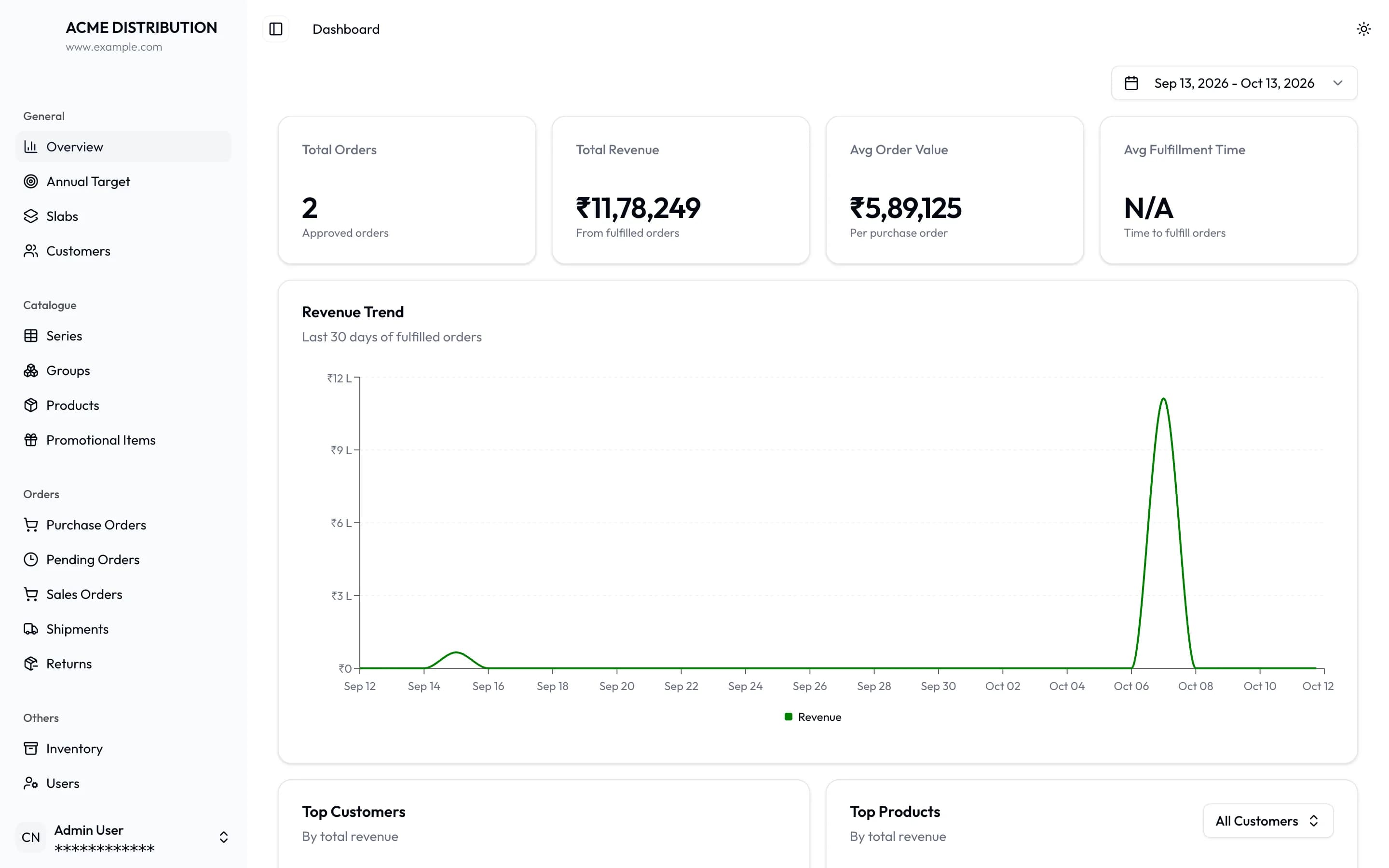
02 / Pricing tiers
Every tier's discounts, side by side
One place to see and edit discounts for every customer type, per series and per product.
FIG. 04.2 / Pricing tiers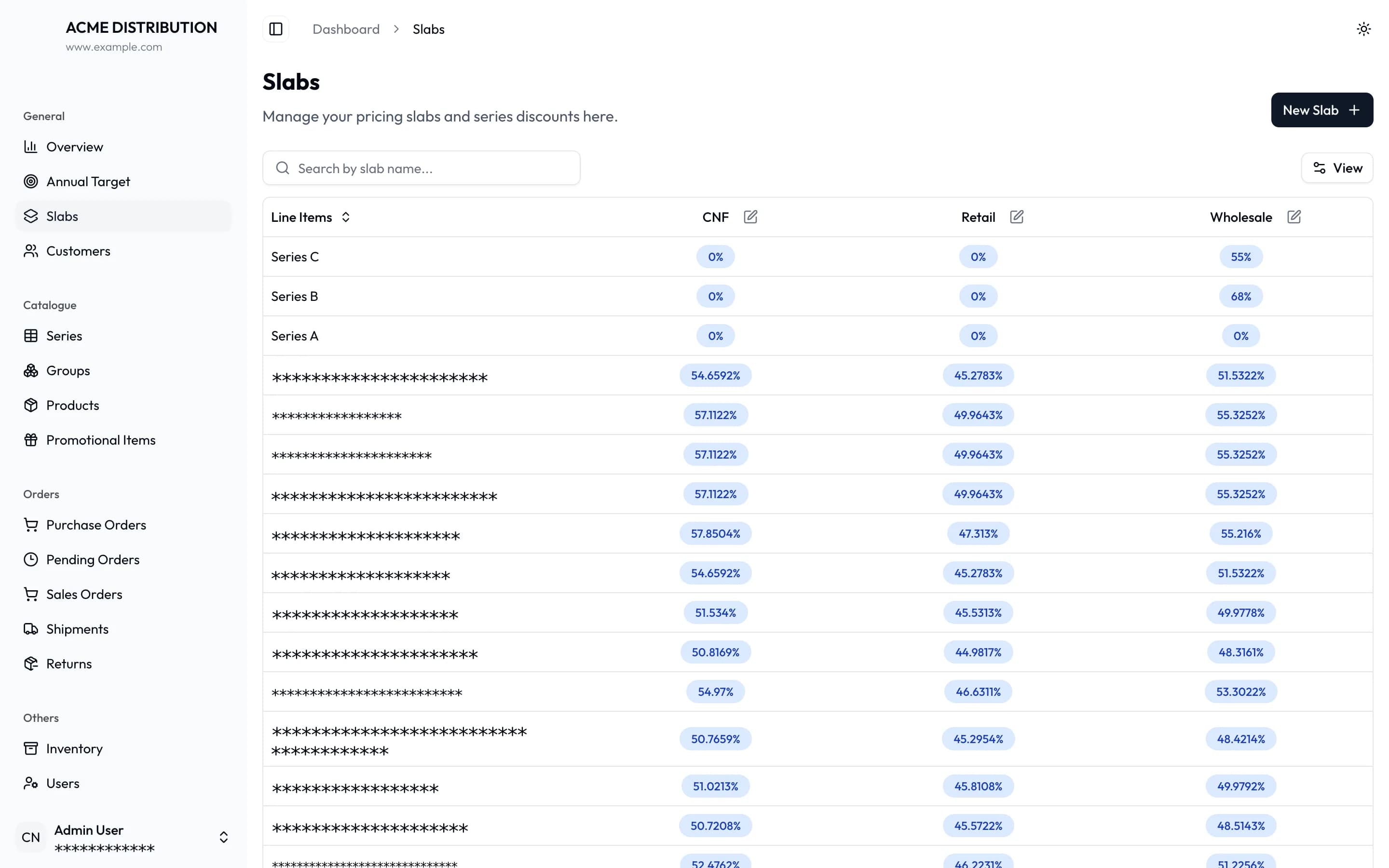
03 / Purchase orders
Drafts on their way to approval
Purchase orders by customer, pricing tier, value and status, filterable by who created them.
FIG. 04.3 / Purchase orders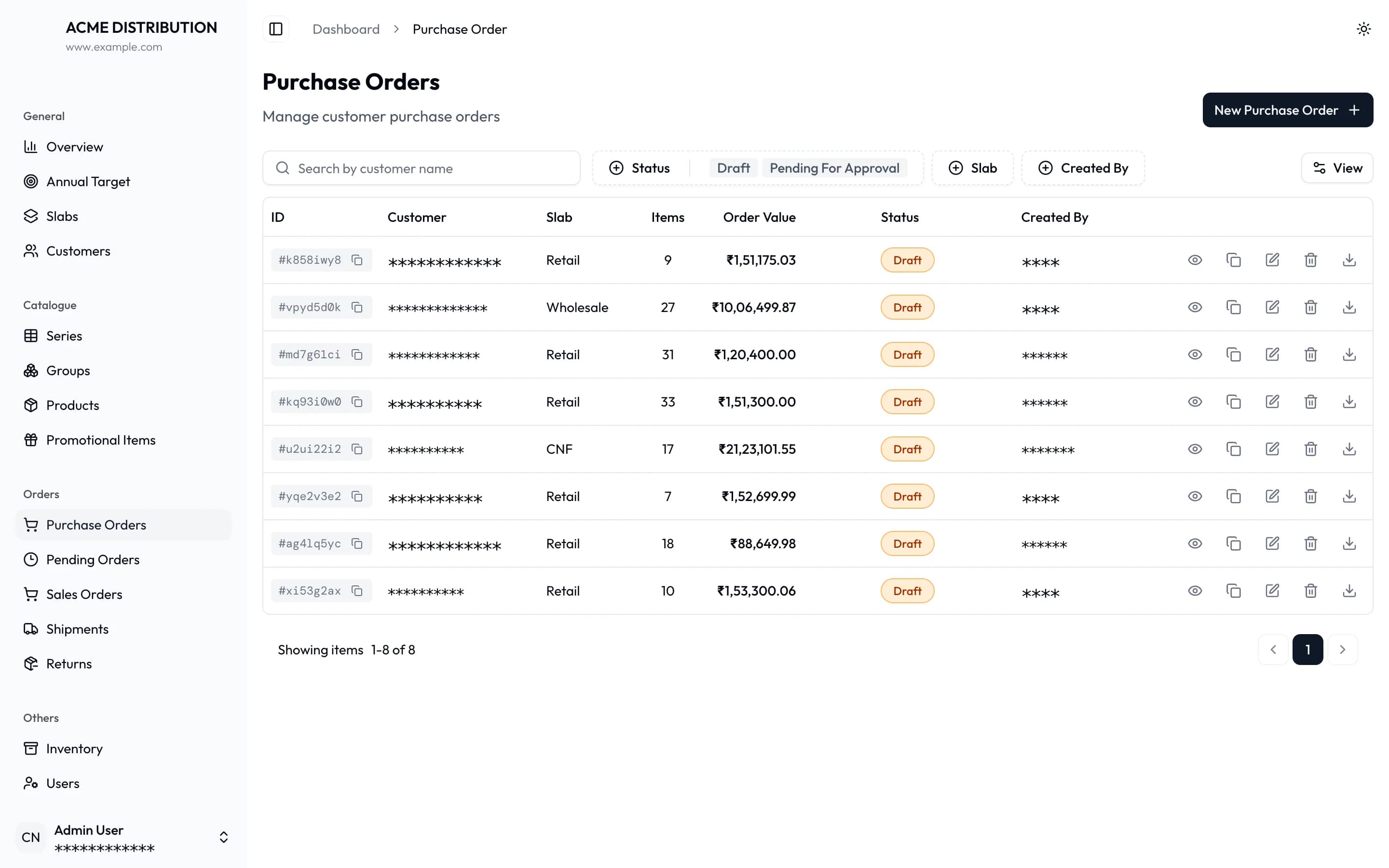
04 / Sales order
One order: what's left to ship
Items still to ship, items already dispatched, order cost and a running audit log, with tabs for shipments, cancellations and returns.
FIG. 04.4 / Sales order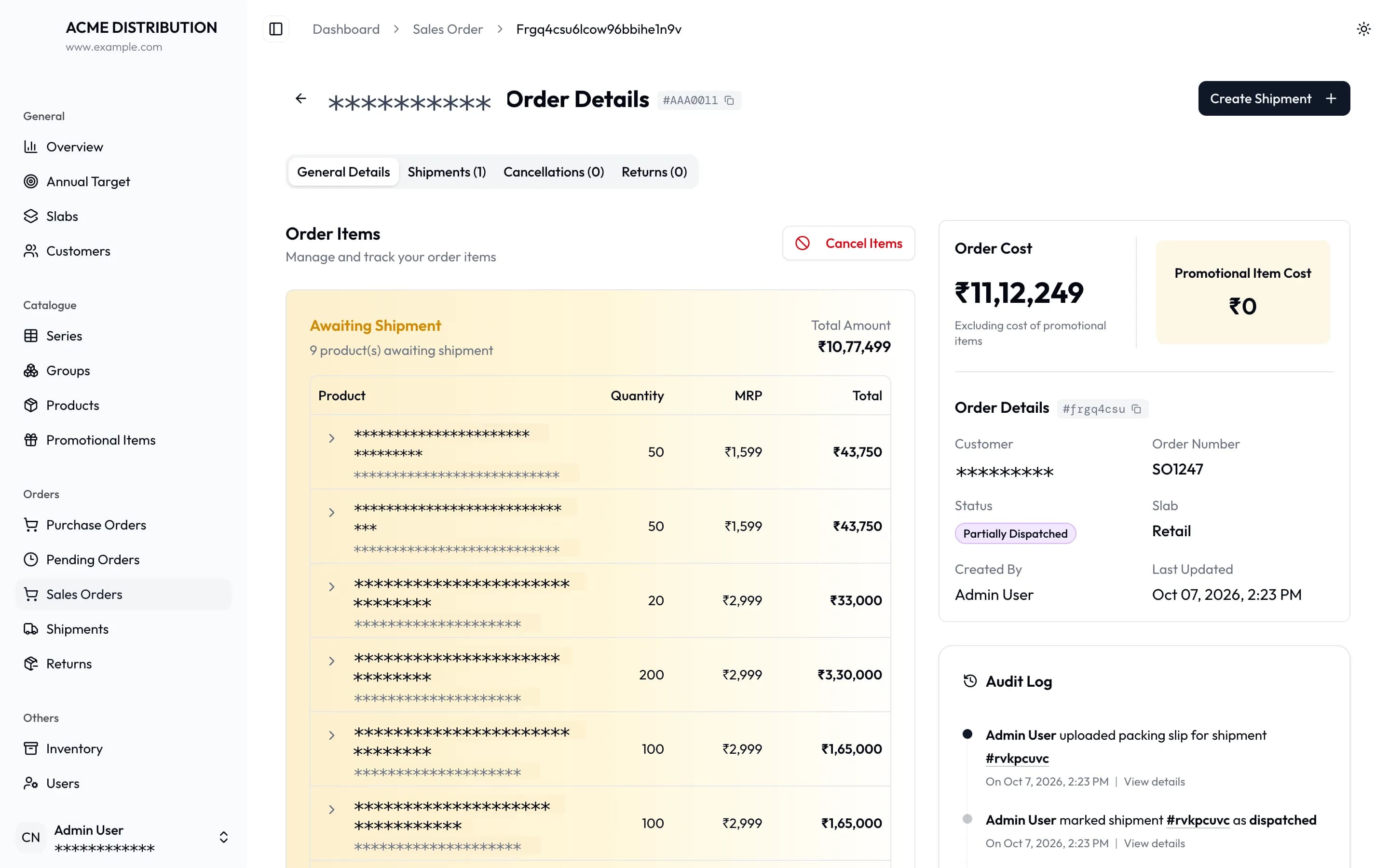
05 / Shipments
Every parcel, traceable
Every shipment with its status, warehouse, invoice amount and courier, filterable and exportable.
FIG. 04.5 / Shipments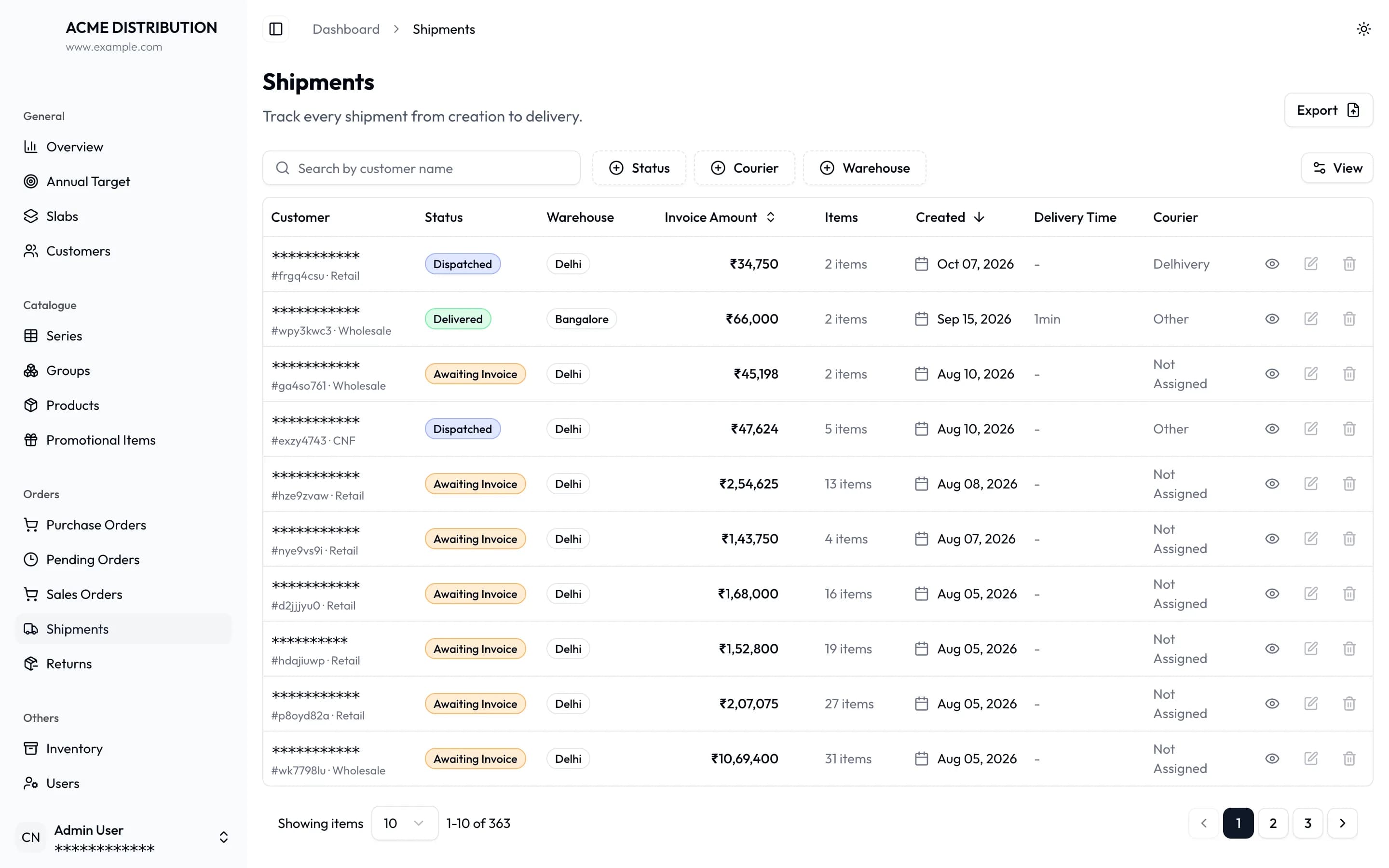
06 / Inventory
Stock down to the batch
Inventory by product, expanded to show each batch's dates, price and available quantity, with low-stock flags.
FIG. 04.6 / Inventory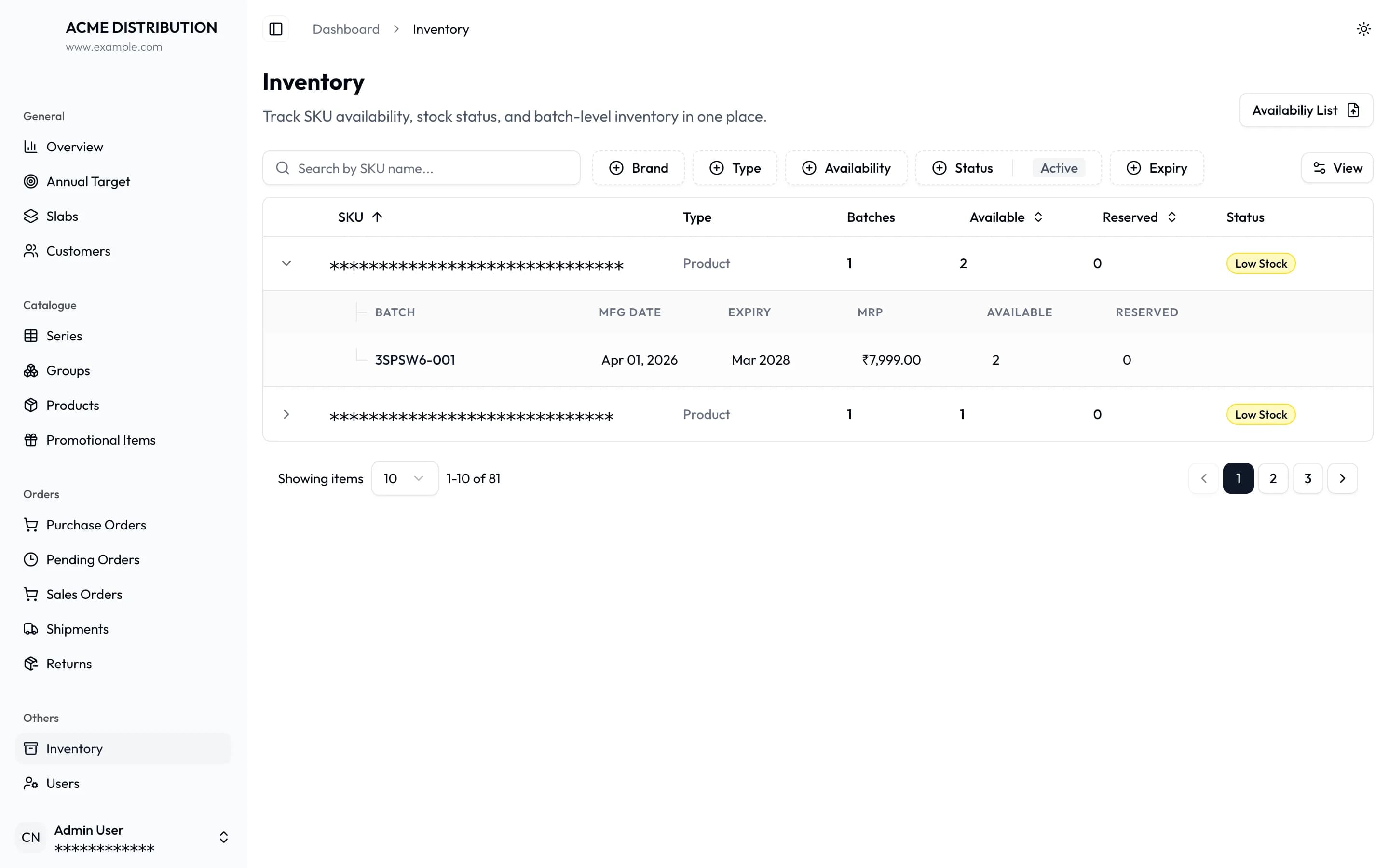
Orders, revenue and fulfilment at a glance
The overview dashboard: orders, revenue, average order value and fulfilment time for any date range, with the revenue trend underneath.
FIG. 04.1 / Dashboard
05 / Architecture
How do the rules stay in one place?
- 01One place for the rulesAll pricing, approval and permission logic lives in the business engine. Every screen and the AI assistant follow the same rules.
- 02Slow work happens in the backgroundRecalculating prices and sending emails never slows down the person placing an order.
- 03Changes are hard to breakThe app and the engine share one definition of every piece of data. A change on one side that would break the other is caught before release.
- 04Built to growEach part can be scaled or updated on its own, and new features plug into the same pattern.
06 / Stack
What is it built with?
- Web app
- Next.js 16, React 19, Tailwind CSS, Radix UI, TanStack Query & Table, Recharts
- Business API
- Bun, Elysia, TypeBox validation, OpenAPI docs
- Type-safe client
- Eden Treaty (generated from the API's own types)
- Authentication & roles
- Better Auth with custom role-based access control
- Database
- PostgreSQL 17, Drizzle ORM
- Background jobs & events
- BullMQ on Redis
- AI connector
- Model Context Protocol (MCP) server with OAuth
- React Email, Resend
- Files
- Flystorage (local or cloud object storage)
- Infrastructure
- Docker, Docker Compose, GitLab CI/CD (staging and production pipelines)
07 / Delivered
What did the client receive?
- 01Web applicationDashboards and full management screens for customers, catalogue, pricing, orders, shipments, returns, inventory, targets and users.
- 02Business APIA documented API covering every feature, with permission checks on each action.
- 03Automation serviceBackground price syncing, low-stock and expiry alerts, purchase-order reminders, automatic rejection of stale orders, and audit logging.
- 04AI-assistant connectorSecure, permission-aware access for AI assistants to ask questions about sales, orders, shipments, cancellations and pending orders.
- 05Email notificationsBranded templates for order, shipment, stock and batch events, plus password resets.
- 06Deployment pipelineContainerised services with automated build and deploy for separate staging and production environments.
- 07DocumentationArchitecture, API, database, features, configuration, deployment and monitoring guides, plus a design spec and plan for each major feature.
08 / Impact
What changed for the business?
One version of the truth
Sales, accounts, warehouse and management all work from the same live data.
Fewer pricing errors
Tier discounts and tax are applied automatically and kept in sync when prices change.
Full traceability
Every order, shipment, stock movement and return has a history of who did what and when.
Better stock control
Batch and expiry tracking, plus automatic alerts, help prevent stock-outs and write-offs.
Faster answers
Managers can check performance on the dashboard, or just ask the AI assistant.
Safe to delegate
Role-based access lets the business add staff without exposing data they shouldn't see.
09 / What's next
Where does the platform go from here?
- 01In-app AI chatA chat screen inside the web app is already in place and marked "coming soon".
- 02Accounting and payment integrationsConnecting invoices and payments to the accounting system and to payment gateways.
- 03Mobile accessA mobile experience for sales staff in the field.
- 04Deeper reporting and exportsMore advanced reports, and exports for every type of record.